Get Less Visible

Introduction
People in the modern world are kind of used to all the survailence that happen around them and often say things like:
I do not care what google (or any other big player) knows about me, I am just a regular person. I have nothing to hide.
I think, that it matters more than ever. The world changes fast and countries get more and more autocratic. This not just means, that the freedom people of developed countries have and had could have reached a peak right now. The one thing autocratic leaders want, is to have full control of the people. This was never more possible than today. Everyone is connected to the internet all day long and most of the people do not know, how to protect. Of course one cannot prevent every kind of survailence, because some types of this survailence are just not avoidable (e.g. we cannot avoid to use infrastructure, like cell towers; so the internet service provider (ISP) could always know where we are). Also organizations could be breached (banks, healthcare provider, schools), which also lies not in our hands.
Level 1: Don’t be lazy
Level 1 describes security and privacy measures, which everybody, who uses the internet, has to do.
So mail is one of the few communication methods which are not centralized. This means everyone can host their own email server and you can send emails from any domain to any other domain (e.g. from gmail.com to proton.me). This is one thing which is not possible with Message Services like Signal or Whatsapp, which would be possible, but the companies do not want to do that mainly because of economic reasons. cite
To keep your email secure and private, start by choosing an encrypted email provider like Proton Mail or Tutanota instead of standard services like Gmail or GMX (which is a broadly used provider in Austria; also it has the worst UI/UX (User interface and User Experience)), as these privacy focused alternatives use end-to-end encryption to ensure that not even the company hosting the servers can read your messages. Always enable two-factor authentication (2FA) to add a necessary second layer of defense against unauthorized logins, and utilize strong and unique passwords generated by a trusted password manager (see below). Finally, be cautious about sharing your primary email address publicly. Consider using email aliases or masking services (like SimpleLogin or Apple’s Hide My Email) to shield your real inbox from spam and potential data breaches.
Search Engines know everything
A search engine is a service which basically knows every website and more on the plant and helps you find things you are searching, most popular is Google. The problem is, that these sites know everything a human thinks about. The thing is - do they really need to store and analyse this stuff. I would say no. Therefore I use a privacy-focused alternative like DuckDuckGo cite or Startpage cite, which prevents the tracking and profiling standard with Google or Bing. You also should change your default search engine in the browser, which is easy to do in the settings of your browser.
🇪🇺 Europe is actually great when it comes to protecting european people in the digital space, so it is always worth to find european solutions, like e.g. Quant cite or Ecosia cite.
DNS - Domain Name Server
Many people actually do not know what happens when they open a webpage in their browser.
Think of the internet as a massive postal network where every building (website) has a precise, numeric geographic coordinate (IP address). Humans, however, cannot memorize millions of coordinates.
DNS acts as the address directory at the post office. When you want to send a letter to “The Library” (the domain name), you don’t know its coordinates. You ask the directory (DNS server), “Where is The Library?” It flips through its pages and replies, “The Library is located at Coordinate 192.0.2.1.” You then write those coordinates on your envelope so the mail carrier (the network) can actually deliver it. Without this lookup service, you would need to know the exact numeric latitude and longitude of every building you ever wanted to visit.
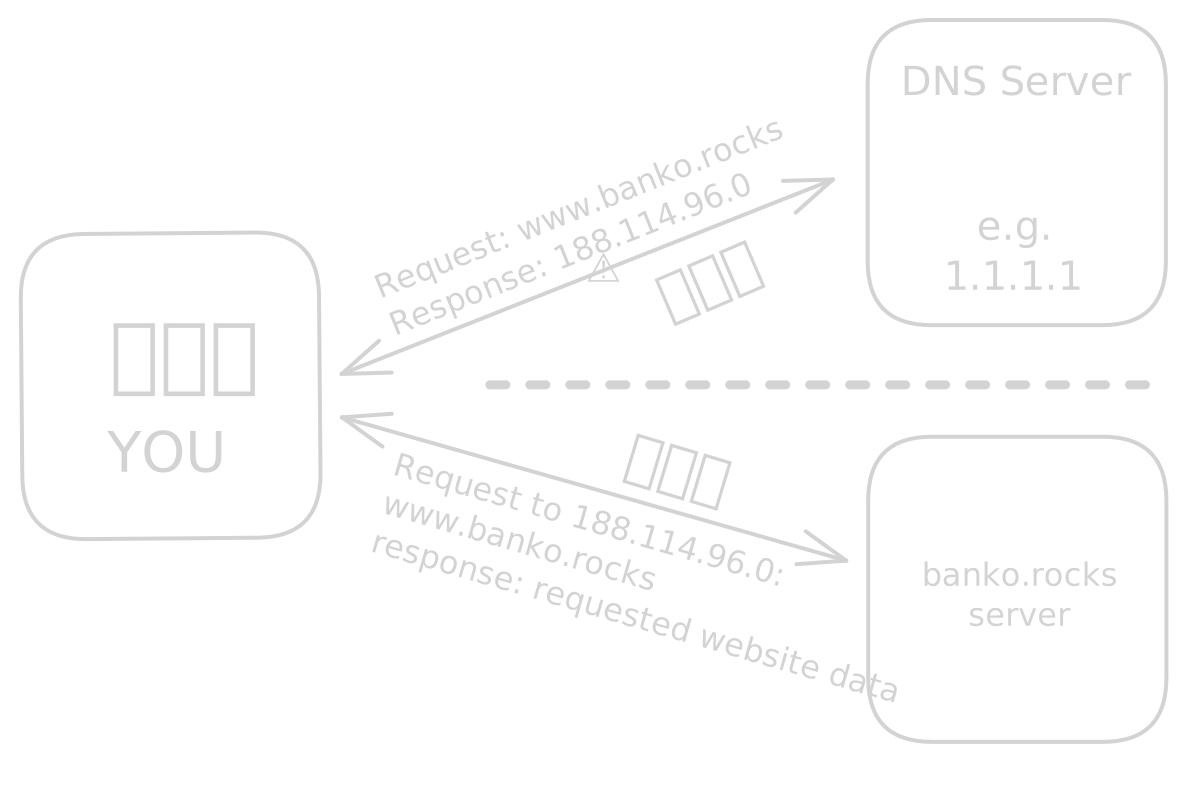
You wonder why you never need to care about that? It is, because the browser or you internet provider automatically choose the DNS server for you, which is a bad thing, because DNS is unencrypted per default and you give away all adresses you search to e.g your ISP for free. (These metadata can be very useful, not only for advertising.)
The data you receive from the server (e.g. online banking, online chats, etc.) are encrypted (if there is a green lock icon in the urlbar on your browser or it states HTTPS), but the DNS is not, but it can be easily.
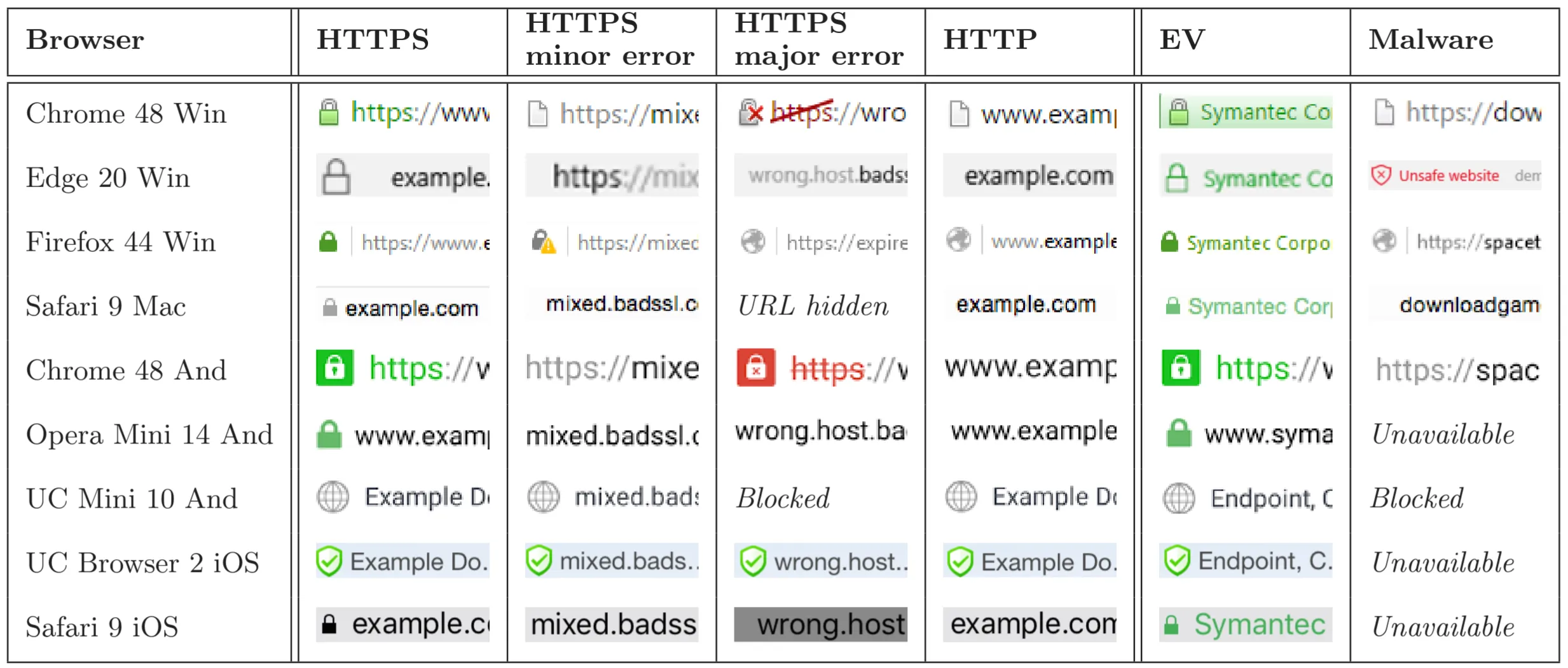
These are some examples of how these indicators look like. It is not dangerous to visit sites which use http or where https is broken, but never insert sensible data into those websites. The date will travel in cleartext to the destination and could (and probably will by some data collectors) be collected and maybe missused. cite
The solution:
Implementing DNS over HTTPS (DoH) or DNS over TLS (DoT) encrypts your domain name lookups so your ISP cannot see exactly which websites you visit, often achieved by changing your system or browser DNS settings to a provider like Quad9 or Cloudflare (1.1.1.1). These are special DNS Servers, which are encrypted as well, so your ISP cannot see your searches.
Go to the settings of your brcowser (e.g. by typing this in the urlbar in firefox about:preferences#privacy or Google Chrome chrome://settings/privacy).
My personal suggestion is the applied privacy dns service cite, which is a service provided by a previous professor, which made my favorite lecture.
Check out cite for a list of DNS servers, which you can use; just make sure to choose one which supports DoH or DoT.
Ad Blocking
Installing a reputable ad-blocker extension such as uBlock Origin cite on all browsers is critical not just for privacy but for security, as it blocks malicious scripts and tracking pixels.
This does not only blocks ads (which is also a great thing), but more crucially it blocks trackers.
Password Manager
Using a password manager like Bitwarden cite or KeePass cite ensures you have unique, complex passwords for every account, mitigating the damage of inevitable database breaches. Also choose a random, complex and unique password for each service you use.
Two Factor Authentication
Enabling two-factor authentication (2FA) wherever possible, preferably using an authenticator app (like Proton Auth) or a hardware key (YubiKey) rather than SMS, adds a necessary layer of account protection.
Always be up to date
Finally, keeping software and operating systems set to auto-update closes known security vulnerabilities before they can be exploited.
Conclusion
So my suggestion for level 1 is: Do not be lazy. It is not that hard to implement these measures, but it can make a huge difference in your online security and privacy.
Also the best security is by design, not by obscurity - therefore use proved to be safe encryption standards and tools and always check of there are european alternatives, because they are often better when it comes to privacy and security, because of the GDPR (General Data Protection Regulation) and other laws.